Chrome extension · Step 2 of the workflow
Etsy Auto-Lister & Model Updater Studio
List phone cases on Etsy in a few clicks — and keep every listing up to date. It creates new listings from your design folders and refreshes your phone-model coverage across your whole shop.
Create new listings
Reads your design folders, copies your template draft, uploads the photos, writes an SEO title, description and 13 tags, fills the SKU, links the variation photos and publishes — one listing after another.
Update existing listings
When a new phone model comes out, change your model list once. The tool refreshes the title ending, the models in the description, the 13 tags and the variation options of every listing you tick.
Less clicking
Copying drafts, uploading up to 20 photos, writing and tagging — done for you while you work on something else.
Consistent SEO
Tidy titles up to 140 characters, your model tags first and AI niche tags after them.
Fresh model coverage
Adds new models and removes only the ones no longer on your list — across hundreds of listings.
Safety nets
Review mode, brand-word warnings, four speed presets, Pause/Stop and a backup before every change.
User guide
Using the Etsy Auto-Lister & Model Updater Studio
The tool adds a small control panel on top of your own Etsy Shop Manager and does the repetitive clicking for you — in your own Chrome, with your own signed-in Etsy account. It has four tabs: 🚀 Publish, 📱 Listing Update, 📜 History and ⚙️ Settings.
What you need
- Google Chrome 138 or newer on a desktop computer (Windows, Mac or Linux).
- Your Etsy seller account, signed in on that Chrome.
- A template draft in your Etsy Drafts and your design folders (see below).
- An internet connection.
- Your tool activated by Veyronix.
The panel
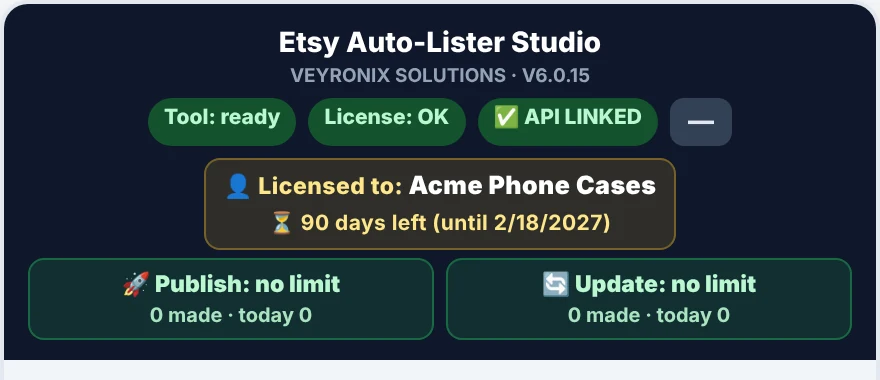
| Item | Meaning |
|---|---|
| Status chips | The tool, your licence and the AI connection are ready. Click a warning chip to re-check it. |
| 👤 Licensed to · ⏳ days left | Your account name and how long your licence is valid. |
| 🚀 Publish · 🔄 Update | New listings and updates made, how many are left and how many today. |
| — (top right) | Minimises the panel to a small tab at the edge of the page. |
While a run is active the Etsy page is locked on purpose, so nothing you click interferes. Pause and Stop always stay available. Drag the panel by its header to move it.
Prepare your designs and your template
Spend ten minutes here once — after that every listing is automatic.
Your design folders
Choose one root folder. Inside it, each design has its own folder with a Mockup subfolder holding the pictures. Folders made by the Phone Case Print & Mockup Studio already follow this layout.
PhoneCaseDesigns/
├── Sunset Palm Trees/
│   └── Mockup/
│       ├── Generate Composition.jpg     ← main (first) photo
│       ├── Design_1.jpg … Design_5.jpg  ← linked to the variation
│       └── (other mockups…)
├── Cute Cat Lover/
│   └── Mockup/ …
└── Pastel Daisy Floral/
    └── Mockup/ …
- Folder name = design name. It becomes the niche for the title, description and tags, and the SKU (up to 32 characters).
- Pictures can be .jpg, .jpeg, .png or .webp.
- Photo order: the main image first (Generate Composition.jpg, otherwise Composition.jpg or White Composition.jpg), then Design_1 … Design_5, then other pictures — up to 20 photos.
- New design folders are picked up automatically while you work.
- Published designs are skipped next time (marked with a small _PUBLISHED.txt file).
Your template draft on Etsy
Create one complete draft in Etsy → Listings → Drafts with everything that is the same for all listings: category, shipping profile, processing time, return policy, your phone-model variation with prices, and quantity. Keep it at the top of your Drafts list. Price and quantity always come from the template — change them there, not in the tool.
Publish new listings
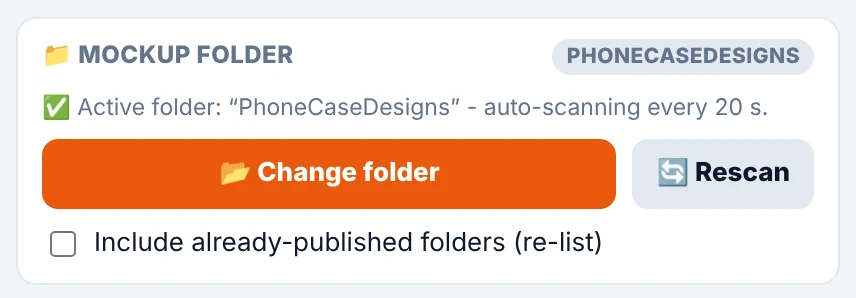
📁 Mockup folder
📂 Choose folder picks your root folder (remembered). 🔓 Authorize appears if Chrome asks for permission again after a restart. 🔄 Rescan looks again now. Tick Include already-published folders to list a design again.
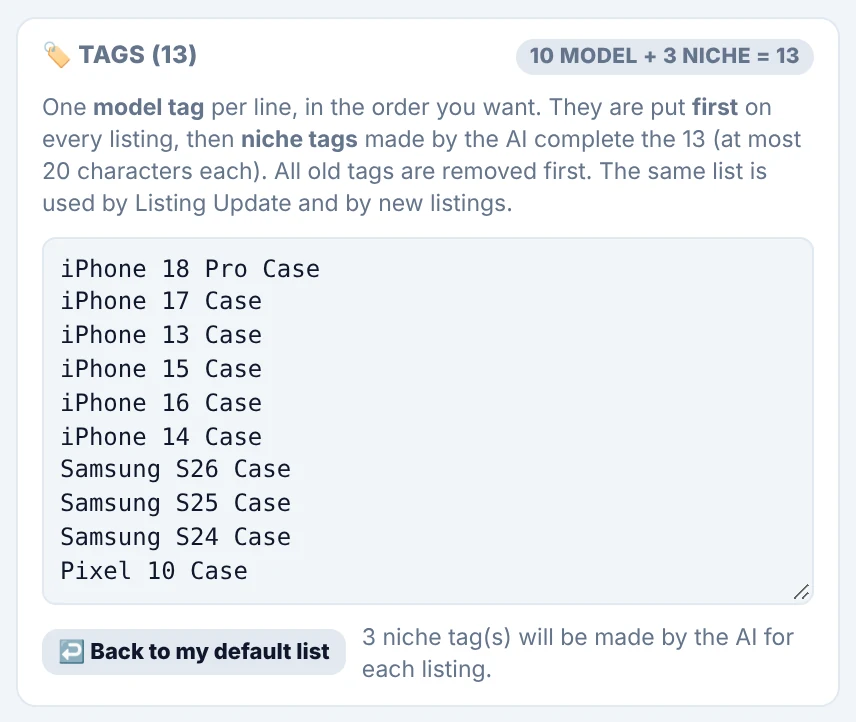
🏷️ Tags (13)
Etsy allows 13 tags of up to 20 characters. Type your model tags one per line, in your order — they go first on every listing. AI niche tags made from the design complete the 13. Old tags are replaced. ↩️ Back to my default list restores your standard list.
⏱️ Speed

| Preset | Use it when |
|---|---|
| 🛡️ Safest (default) | Slowest and most human-like — the fewest surprises. |
| ⚖️ Balanced | A sensible everyday choice — try it on 2–3 listings first. |
| ⚡ Fast | Clearly quicker; watch the first few listings. |
| 🚀 Turbo | Fastest — only for a few listings you can watch. |
Publish and Listing Update each have their own speed setting. Etsy is more relaxed about people than about robots, so slower is safer.
Queue and working mode
The queue lists every design folder that is ready, with its photo count. Tick what to publish, choose a mode and press 🚀 Start Auto-Publish (N). Your remaining listings are shown under the queue.
| Mode | What happens |
|---|---|
| ⚡ Full Auto | Runs without stopping. Before it starts, designs that may contain a brand, character or trademark word are listed: Start anyway (the words are removed automatically), Leave these out, or Cancel. |
| 👀 Review each | Before each listing is saved, you see and can edit the title, description and tags. |
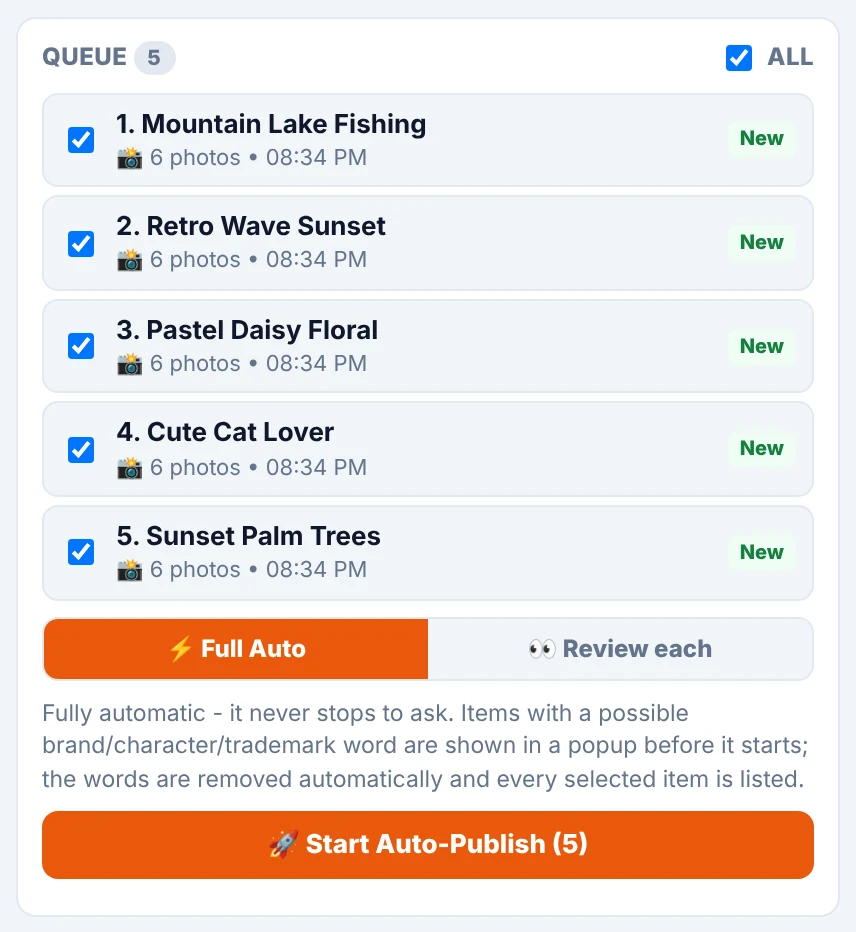
Review card and the live run
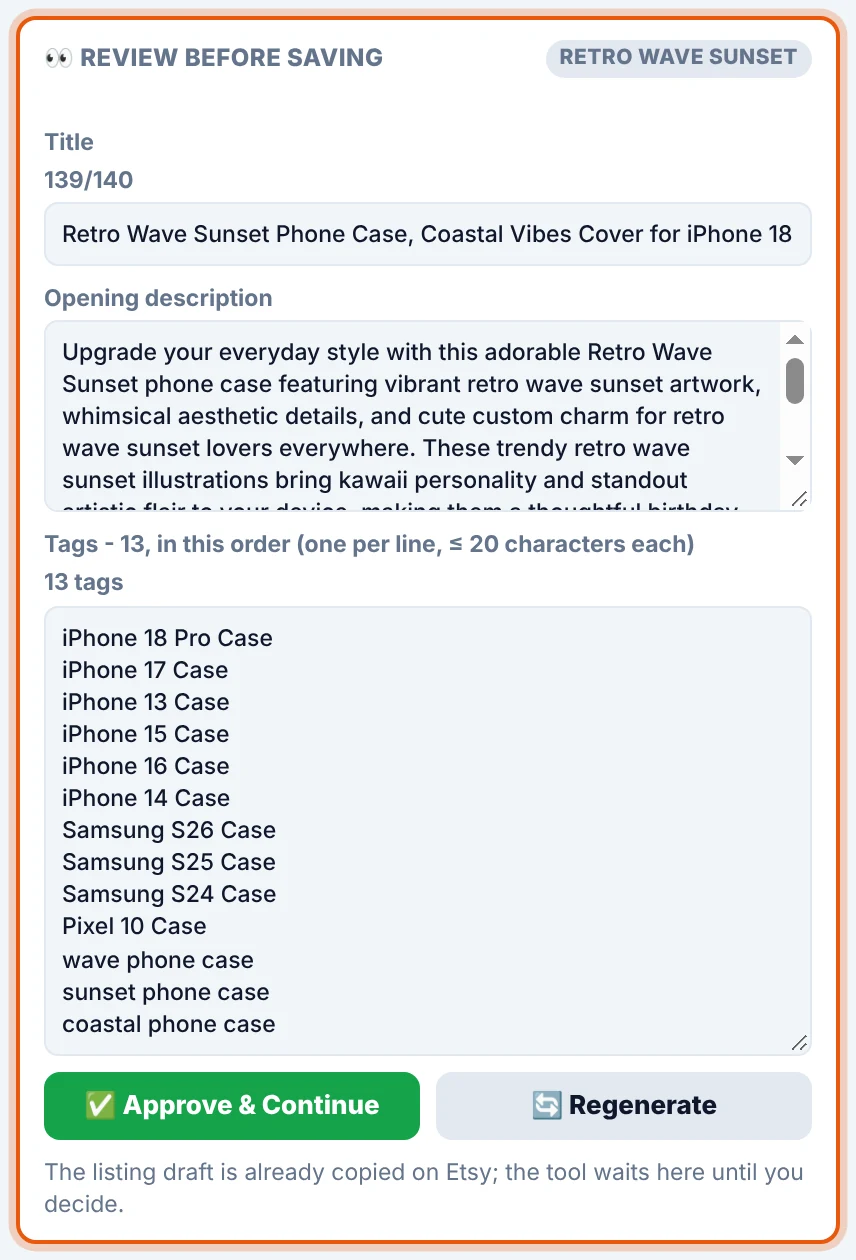
👀 Review before saving
Edit the Title (live counter, Etsy’s limit is 140), the Opening description and the 13 tags (one per line, each up to 20 characters). Press ✅ Approve & Continue to save, or 🔄 Regenerate for a new version.
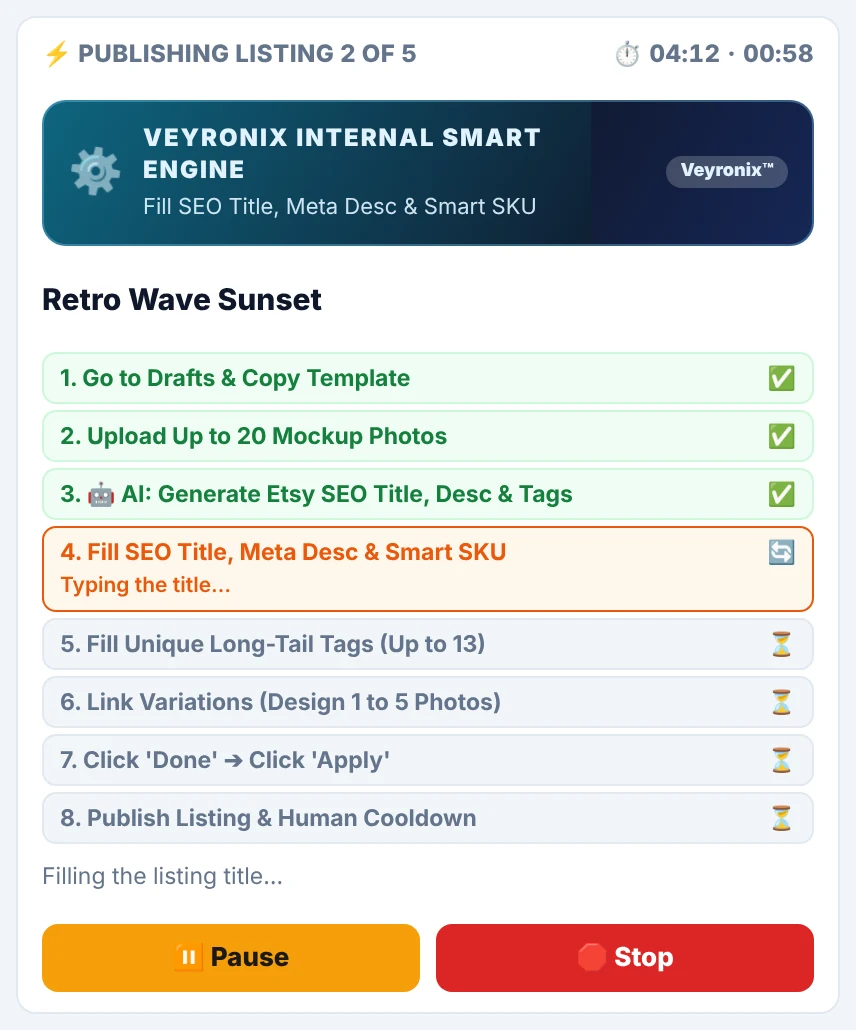
The live run
The panel shows which listing it is on, a timer and each step as done, working or waiting:
- Copy your template draft
- Upload up to 20 mockup photos
- Write the SEO title, description and tags
- Fill the title, meta description and SKU
- Fill up to 13 tags
- Link the variations to the Design 1–5 photos
- Done → Apply
- Publish and take a short, human-like break
⏸️ Pause freezes the run, 🛑 Stop cancels it. Keep the Etsy tab in its own window and don’t minimise it.

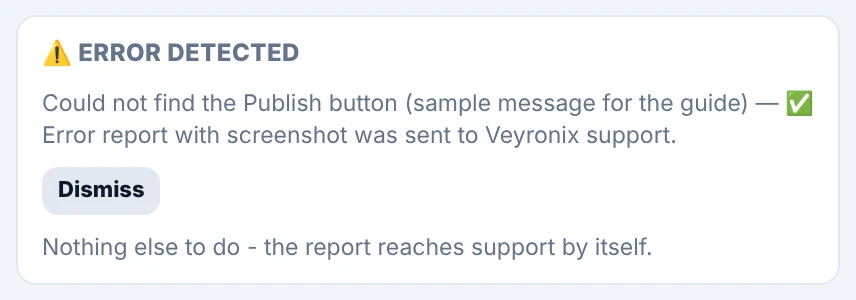
If something goes wrong, the run stops safely and an Error detected card explains what happened. Press Dismiss and start again — designs already published are skipped.
Listing Update — keep every listing current
| Option | What it does |
|---|---|
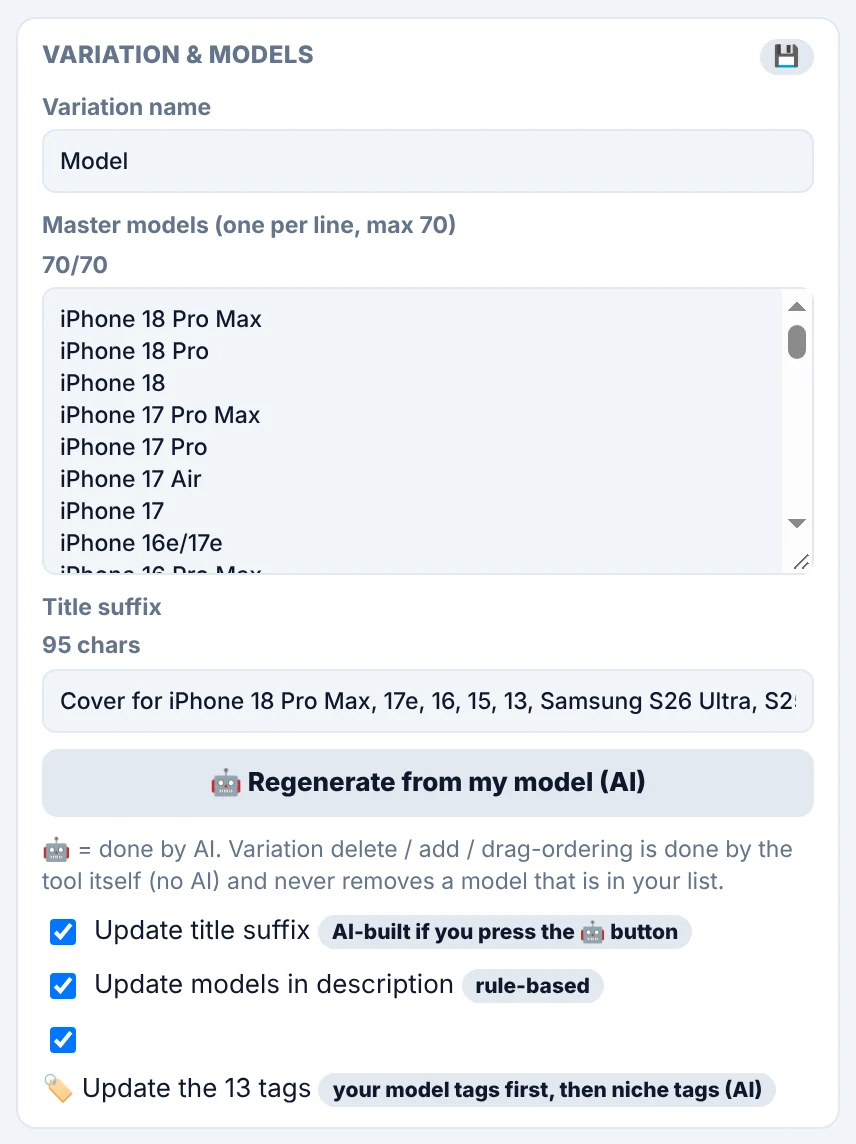
| Variation name | The name of your variation on Etsy (normally Model). |
| Master models | Your phone models (up to 70), in your order. Missing models are added, models not on your list are removed — a model on your list is never removed. |
| Title suffix | The model ending of your titles. 🤖 Regenerate from my model builds one for you. |
| ☑ Update title suffix | Keeps the design words and replaces the model part, within 140 characters. If it doesn’t fit, the last models are dropped — never your niche words. |
| ☑ Update models in description | Refreshes the model names in the description. |
| ☑ Update the 13 tags | Your model tags first, then AI niche tags. |
📋 Your active listings
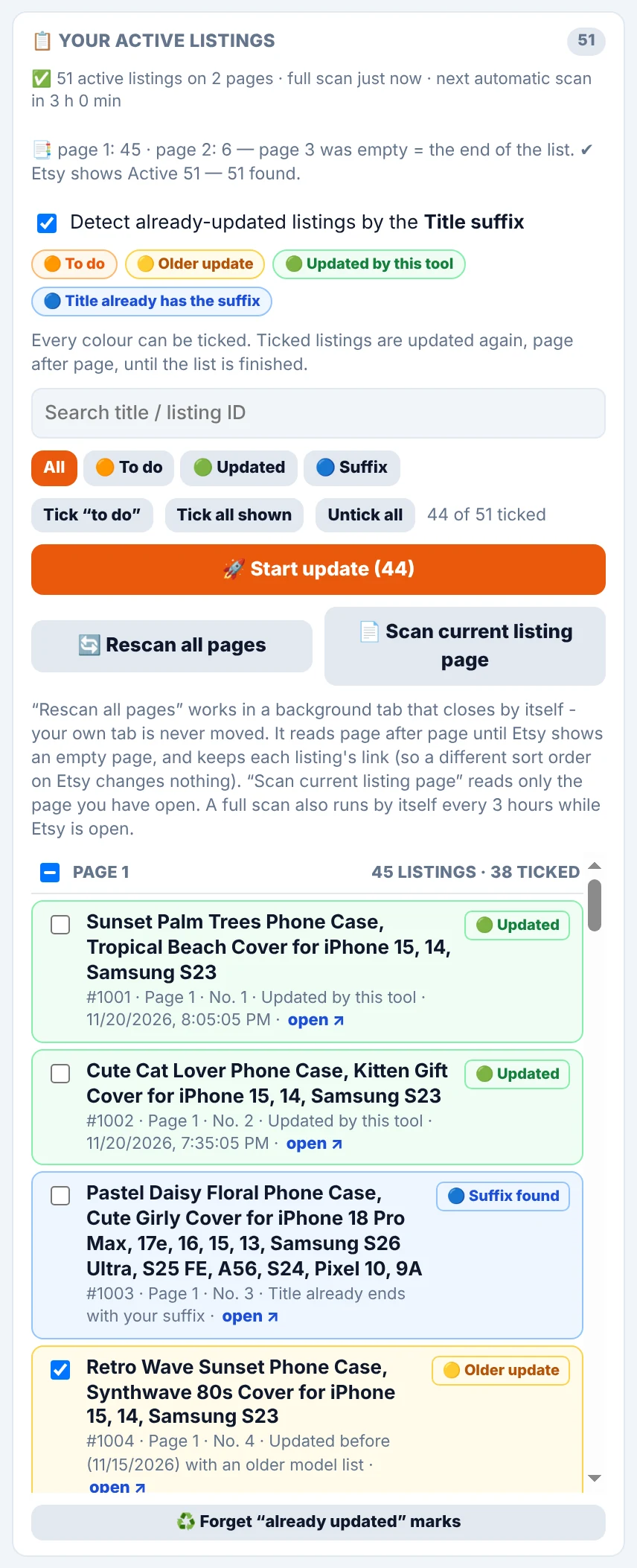
The tool reads all pages of your Active Listings in a background tab and tells you if anything is missing (for example “Active 51 — 51 found”). A full scan also runs every 3 hours while Etsy is open.
| Colour | Meaning |
|---|---|
| 🟠 To do | Not updated yet |
| 🟡 Older update | Updated before, with an older model list |
| 🟢 Updated | Already up to date with your current list |
| 🔵 Suffix | The title already ends with your suffix |
Use the search box and the All · To do · Updated · Suffix filters, tick listings quickly (Tick “to do”, Tick all shown), then press 🚀 Start update (N).
For each ticked listing the tool updates the title and description, replaces the 13 tags, deletes only models missing from your list, adds and orders the new ones, and publishes the changes. A backup of every listing is saved right before it is changed.
The Listings — last change list shows each listing with the date and a short summary of the last change (for example “title/description, 13 tags, −3/+5 models”).
History & backups
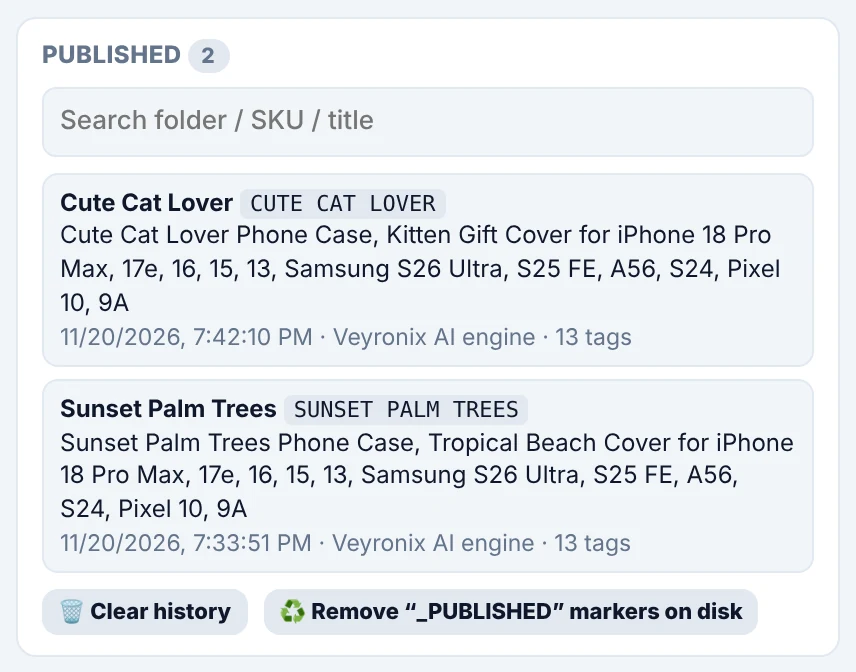
- Published — every listing the tool published, with SKU, title and date.
- Listing Update runs — one line per run: date, listings and duration.
- Keep my history — ⬇️ Export / ⬆️ Import history (.json) before changing computers.
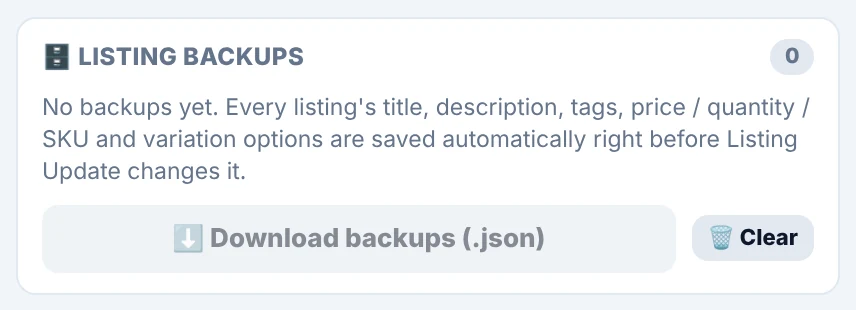
- Listing backups — title, description, tags, price/quantity/SKU and variations saved before every update.
Settings you may use
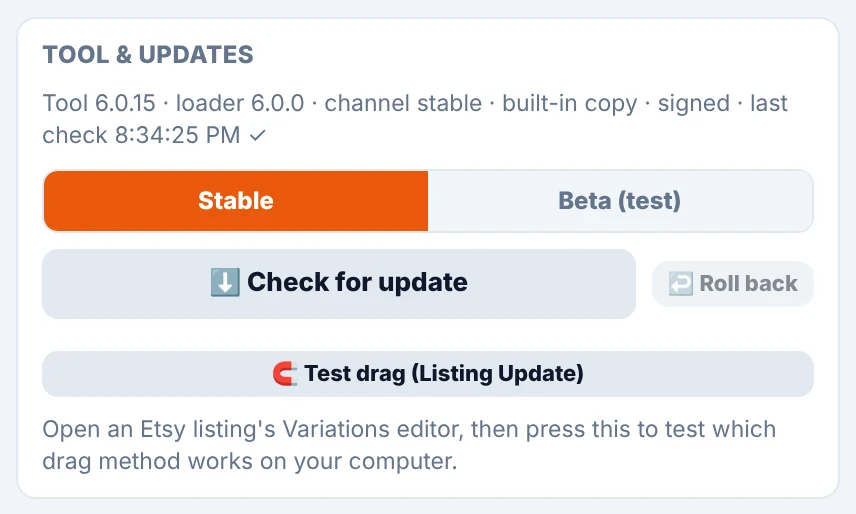
- Stay on the Stable channel. ⬇️ Check for update forces a check; ↩️ Roll back returns to the previous version.
- Leave Auto error report on so we can fix problems quickly.
- If the tool ever asks you to click a button once, do so — it remembers.
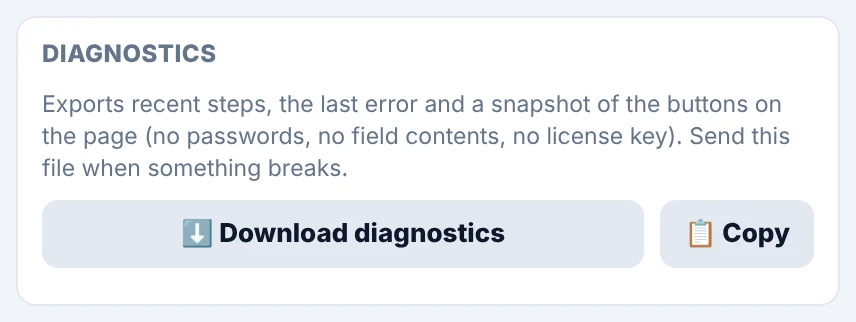
- ⬇️ Download diagnostics or 📋 Copy when support asks for them.
Best practices
- Start small. Run 2–3 listings on Safest or Balanced and check them on Etsy before a big batch.
- Use Review each for your first runs; switch to Full Auto when you trust the results.
- Be gentle with Etsy. Faster presets mean a higher chance that Etsy slows you down or asks for a security check.
- Keep the Etsy tab in its own visible window and don’t use it during a run.
- Prepare your template carefully — every listing copies it.
- Name folders carefully and avoid brand, character and trademarked words.
- Keep your model list tidy (max 70) and in your order.
- Export your history before removing the tool or changing computers.
- You are responsible for your listings: follow Etsy’s seller policies and check your results.
Troubleshooting
| Problem | What to do |
|---|---|
| The panel does not appear on Etsy | Open a Shop Manager page while signed in and reload it. If it still doesn’t appear, message us. |
| Licence shows “locked” or “pending” | Message us on WhatsApp with the version number from the top of the panel. |
| The API chip shows a warning | Click the chip to re-check and check your internet connection. |
| The queue is empty | Each design folder needs a Mockup subfolder with pictures. Press Rescan; tick re-list for designs already published. |
| Chrome asks about the folder again | Press 🔓 Authorize. |
| Listing Update scan finds nothing | Press 👁 Try again with a visible tab and make sure you are on Active Listings of the same shop. |
| A run stopped with “Error detected” | Press Dismiss and run again. If it repeats, send us the diagnostics. |
| Etsy shows a security check or is slow | Stop the run, solve the check yourself, switch to Safest or Balanced and continue with fewer listings. |
| Limit reached | Message us to add more listings. |
| A new version behaves badly | Settings → ↩️ Roll back, then message us. |
FAQ
Does it work on Mac, Linux and Windows?
Yes, on desktop Chrome 138 or newer. Other browsers and mobile devices are not supported.
Do I give you my Etsy password?
No. The tool runs inside your own Chrome on the Etsy pages you are already signed in to.
Is it only for phone cases?
It is designed around a phone-model variation, so it is built for phone-case sellers.
What does the AI write?
The title, the opening of the description and niche tags, based on your design name. In Review each mode you can edit all of it before saving.
Can I stop in the middle?
Yes — Pause or Stop at any time. Listings already published stay published.
Can I undo a Listing Update?
Every listing is backed up before it is changed (History → Listing backups → Download), so you can restore details by hand.
Is it approved by Etsy?
No. It is an independent tool by Veyronix Solutions that automates actions you would otherwise do yourself on the Etsy website.
Screenshots were taken in a demonstration environment with sample shop data.
Start with both tools
Create your listing kits and publish them automatically — from €10 per month, activated for you.